NibPublishing from a phone
Publishing to Ghost from your phone
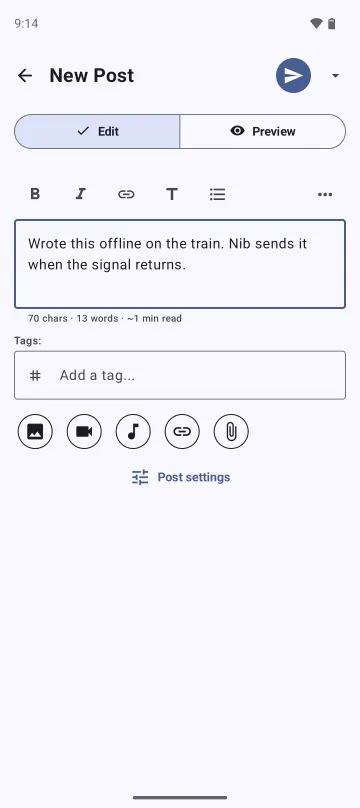
You think of a post on a walk, at an event, on a train. Publishing it from a phone browser takes twenty minutes, so it waits for a laptop, and often never happens.
Nib is for those posts. You write it where you are and publish from the same screen.
Three ways to start a post
-
From another app's share sheet
Share a link from a browser, a photo from the gallery, or selected text from any app that offers Android's Process text. It opens in the composer as a draft. A link gets its preview, and Nib copies the image into its own storage, so the draft keeps it even if the other app withdraws access.
-
From the home screen
A widget or a launcher shortcut opens a new post for a specific blog. If you run more than one publication, the shortcut names which one, and the post can only go there.
-
From inside Nib
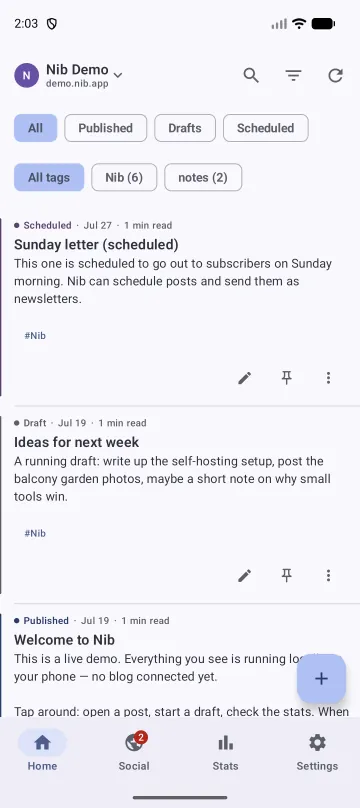
The timeline shows published, draft and scheduled posts in one list, so yesterday's unfinished note is one tap away.
What happens when you press Publish with no signal
Nib retries on its own, and it cannot lose the post or publish it twice while it does.
Saved first, sent second
Nib writes every post to a local database before it starts an upload. Closing the app, losing the network or restarting the phone does not cost you the text.
Retried in the background
A background job keeps trying until your site accepts the post. You do not need to keep Nib open. If you allow notifications, Nib tells you how it went.
Never published twice
Sometimes Ghost accepts a post and the reply gets lost on the way back. Nib records what it sent and checks your site before it tries again, so a retry cannot create a second post or send a second newsletter.
One queue per blog
Each connected blog has its own key and its own queue. A post waiting for signal cannot appear on the wrong site.
What you can set before it goes
The title is optional. Leave it empty and Ghost gets a short note without one. You can also set the excerpt, slug, canonical URL, visibility and feature image, turn hashtags into tags, add images with alt text and captions, add link previews, and attach video, audio or files as Ghost cards.
Pick the editor per blog: a plain text field, or a formatting bar with headings, quotes, lists, dividers and code. Switching later does not change posts you already wrote.
Try it on your blog
Writing, drafts and the offline queue are free. You need a Ghost 5 or newer site and an Admin API key.
Get Nib on Google PlayAndroid 8.0 or newer.